


Archo – AI Interior Design
4.162.00 Reviews
App Specs
- Version
- 1.3.2
- Updated On
- License
- Free
- Downloads
- 1,000,000+
- Developer
- ATQ - AI Lab
- Categories
- House & Home
- Platform
- Android
Screenshots
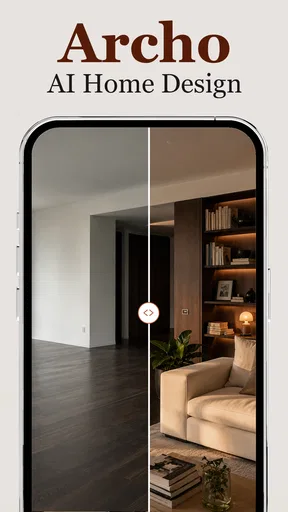
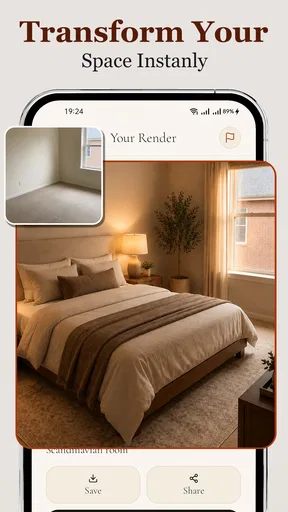
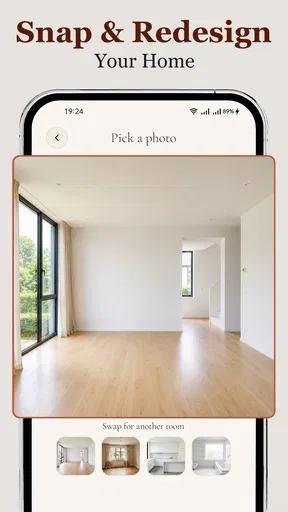



 Analysis by AppCompare
I judge an interior-design app by whether it helps me make a decision I can use in my actual home, not just produce an attractive picture. Archo – AI Interior Design is aimed at that first, uncertain stage: imagining how a room might look with a different mood, palette, or arrangement. It can make brainstorming feel less intimidating, but I’d treat its ideas as a starting point rather than a ready-made renovation plan.
What a room redesign can—and cannot—tell you
The useful question is not simply whether an AI image looks stylish. It’s whether it helps you work out what you want to change. A visual redesign can make broad choices easier to compare: a calmer palette against a bolder one, or a more open-looking room against a cozier feel. That is valuable when you know your current space is not working but cannot yet explain why.
I would still separate inspiration from practical planning. An appealing image cannot by itself tell you whether a sofa will fit through a doorway, whether a proposed layout leaves enough room to walk, or whether a surface will hold up to daily use. Before buying anything or booking tradespeople, I’d check dimensions, materials, lighting, and the realities of the room independently.
Readable choices matter more than visual polish
For a home-design tool, clear navigation matters because people often use one while making decisions with someone else: a partner, a housemate, or a family member. The published experience presents itself as a way to explore room changes, so I’d approach each suggestion as a conversation prompt. Instead of asking, “Do we like this whole design?”, try asking, “Would we keep this wall color?” or “Does this arrangement solve the problem we have?” Smaller questions make visual options easier to discuss.
There is a trade-off in photo-based design: the more carefully you frame the room, the more useful the result is likely to be as a point of comparison. I’d take a straightforward picture from a position that shows the main furniture and the room’s boundaries, rather than cropping tightly around a decorative detail. Keeping a copy of the original photo also gives you a stable reference when judging whether a suggested change is genuinely appealing or merely different.
Using it at a comfortable pace
Not everyone wants to make several design choices in one sitting. I’d use an app like this in short bursts: explore a room, note one or two ideas, then come back after looking at the space in daylight and evening light. That pause helps prevent a dramatic-looking concept from becoming an impulsive shopping list. It also makes the process easier for people who find busy visual comparisons tiring.
Anyone who has difficulty with small controls, dense screens, motion, or strong visual contrast should pay attention to how the interface feels on their own device. I would not assume that an AI design app is comfortable for every sensory or motor preference. If moving through the controls is frustrating, a larger screen, device-level display adjustments, or a simpler mood board made from saved images may be a better route. The important point is to choose a method that lets you focus on the room rather than wrestle with the tool.
Worth Reading Before You Choose

Flipboard Shows What News Apps Must Do Beyond the Feed

Switching to Android Auto Means Rethinking Your Driving Routine

Google Calendar Makes a Crowded Week Easier to Manage

Ludo King Makes the Most of the Minutes Between Plans

Baby Panda World Brings Quick Play to Modern Phones, but Its Game Library Feels Busy

ESPN’s Live Game View Makes Following Close Games Easier
When the setting changes the answer
A room does not look the same in every context. A design that seems inviting in a bright daytime image may feel quite different under warm lamps, and an uncluttered concept may not suit a home where toys, mobility aids, work equipment, or everyday storage need to remain accessible. I’d use generated concepts to explore atmosphere, then check the actual room at the times and in the conditions when it is used most.
This is especially helpful for renters or anyone making reversible changes. A new arrangement, removable décor, or a different color direction may be easier to test than structural work. If you rent, share the room, or need to preserve clear routes through it, treat those requirements as fixed boundaries before considering an aesthetic suggestion. A design is only a good fit if it works for the people who use the space.
Trying Archo in a real home
Imagine that I’m tired of a living room that feels cramped, but I’m not ready to replace the furniture. I’d use a photo-based redesign to explore whether a lighter visual palette or a different-looking layout makes the room feel more open. Then I’d compare the concept with the real measurements, mark the walking routes, and discuss the changes with anyone who shares the space. That turns an attractive image into a manageable experiment instead of an expensive commitment.
Where AI fits among the usual alternatives
Compared with browsing room photos or saved inspiration boards, an AI redesign can feel more personal because the starting point is your own space. A collection of reference images is still better when you want reliable examples of a particular product, material, or real-world finish. Compared with drawing a floor plan in a dedicated planning tool, visual concepts may be easier for early brainstorming, while a measured plan is the stronger choice for checking whether furniture and circulation will actually fit.
I see these methods as complementary rather than interchangeable. Inspiration boards help clarify taste; a room visualization helps explore possible directions; measurements and a floor plan help test feasibility. If you already know the exact dimensions and need to plan a renovation precisely, I would begin with a measuring or floor-planning method. If the main problem is “I can’t picture what might suit this room,” an AI-oriented app is more relevant.
Small workflow choices that improve the result
One useful habit is to change only one decision at a time when comparing ideas. If you alter the palette, layout, furniture style, and mood all at once, it becomes hard to tell what actually improved the room. I’d first settle on the feeling I want, then compare colors, and only afterward think about arrangement or purchases. This makes the output easier to evaluate and reduces the temptation to copy a complete look that may not suit the household.
Another practical safeguard is to write down what must stay: a sofa that cannot be replaced, a clear route to a doorway, a desk used for work, or storage that handles daily clutter. These constraints help me judge a concept against the real brief rather than against an idealized empty room. They are also useful when sharing options with someone who has different tastes; both people can assess the same non-negotiables before debating style.
Who is likely to find it useful
I’d recommend trying it if you are at the idea-gathering stage, enjoy visual experimentation, and can treat generated designs as suggestions. It may suit someone preparing to refresh one room, a first-time renter trying to make a space feel more personal, or a household that needs a clearer way to compare broad design directions before spending money.
I’d be more cautious if you need precise construction drawings, dependable product specifications, or a guaranteed accessibility-conscious layout. Someone who already knows the exact furniture and dimensions they need may get more value from a measured floor planner. And if visual tools are tiring or difficult to operate, a simple conversation with a designer or a low-tech collection of reference images may be less frustrating.
What to consider before spending
The app is free to download, with in-app purchases listed from $7.99 to $39.99 per item. I’d explore the free experience first and decide whether its particular way of generating ideas helps with a real room before paying for anything. The developer is ATQ - AI Lab, and the app is listed for Everyone; that age label does not mean every design suggestion is suitable for every household or every physical need.
It has a 3.1 average from around 1,600 ratings and more than 500,000 installs. I would read that rating as a reason to set measured expectations, not as proof that the app will or will not work for me. The current version is 1.3.1, and it requires Android 7.0 or later. Those practical details help establish whether it is an option for your device, while your own test of the interface and results should decide whether it deserves a place in your planning process.
Readability and navigation in practice
When I first launched Archo – AI Interior Design, I was greeted with a sleek and modern interface that immediately made me feel like I was stepping into a world of creativity and style. The app's user-friendly navigation makes it easy for anyone to jump right in, whether you're a design novice or a seasoned pro.
The home screen offers various options like "Design a Room," "Browse Ideas," and "Virtual Consultation." Each section is tailored to provide a unique experience, ensuring that all your design needs are covered in one place.
Diving into the Features
One of the standout features is the "Design a Room" section. Here, you can upload a photo of your space and let the AI work its magic. Within moments, I had a range of design suggestions, from minimalist chic to bohemian vibes, each with a detailed breakdown of furniture and color schemes. It’s like having a design assistant who knows exactly what you’re looking for.
Another cool feature is the "Browse Ideas" section. This is your go-to for inspiration. You can scroll through countless design ideas, saved directly by style or room type. It's perfect for when you're feeling stuck or just need a little nudge in the right direction.
The Virtual Consultation Experience
Now, for those of you who want a more personalized touch, the "Virtual Consultation" option is a game-changer. You can schedule a session with a professional designer through the app. I tried this feature, and it was like having a friendly chat with an expert who truly understood my vision. The designer provided actionable tips and even helped me pick out items that fit my budget. Talk about convenience!
User Experience and Performance
In terms of performance, the app runs smoothly without any hiccups. The AI-generated designs load quickly, and the navigation is intuitive. I love that the app is regularly updated with new design trends and features, keeping it fresh and relevant.
The app also offers a fun "Before and After" feature, which lets you see the transformation of your space. Trust me, seeing your dull room evolve into a Pinterest-worthy space is incredibly satisfying.
The Social Element
Archo isn’t just about individual design; it also has a social element where you can share your designs and get feedback from the community. It's a fantastic way to connect with other design enthusiasts and gather even more inspiration.
Plus, you can follow popular designers and get a peek into their portfolios. The app creates a rich, interactive experience that truly sets it apart from other interior design apps.
An inclusive verdict
So, is Archo – AI Interior Design worth the download? Absolutely. Whether you’re planning a complete home makeover or just looking to spruce up a single room, this app is your go-to. The combination of AI-driven design and professional consultation makes it a versatile tool for any design enthusiast.
Overall, Archo – AI Interior Design provides an engaging, easy-to-use platform that brings out the interior designer in everyone. It’s like having a design studio at your fingertips, ready to turn your home into a masterpiece. So, if you're ready to give your space a stylish upgrade, why not give Archo a try?
My recommendation comes with a practical caveat: use the visual ideas to help you talk through possibilities, not to replace measurements, professional judgement, or the needs of people who live in the room. A design tool is most inclusive when the person using it can comfortably navigate it and when the finished space works for different bodies, routines, and sensory preferences. If the interface suits you and you keep those real-world checks in the process, it can be a worthwhile way to move from vague ideas toward a clearer plan.
Pros
- User-friendly interface for easy navigation.
- Wide variety of design styles available.
- AI suggestions are highly personalized.
- Quick rendering of design previews.
- Supports both Android and iOS platforms.
Cons
- Limited free features; in-app purchases needed.
- Occasional glitches in AI suggestions.
- Requires stable internet for best performance.
- High battery consumption during use.
- No offline mode for design creation.
FAQs for Archo – AI Interior Design
What is Archo – AI Interior Design, and how does it work?
Archo – AI Interior Design is an innovative app that uses artificial intelligence to help you design and visualize interior spaces. By inputting your room dimensions and style preferences, the app generates design ideas tailored to your needs. It offers 3D visualizations, allowing you to see potential layouts and furnishings in a realistic setting.
Is Archo – AI Interior Design suitable for beginners in interior design?
Yes, Archo is perfect for beginners. Its user-friendly interface guides you through the design process step-by-step. The AI offers suggestions based on your inputs, making it easy to explore different styles and layouts. Whether you’re new to design or a seasoned pro, Archo provides valuable insights and inspiration.
Are there in-app purchases or subscription fees in Archo?
Archo offers both free and premium versions. The free version includes basic design tools and features, while the premium version, available via subscription, unlocks advanced tools, additional design options, and exclusive content. It’s important to review the app’s pricing structure to understand what fits your budget and needs.
Can I use Archo to design commercial spaces, or is it only for homes?
Archo is versatile and can be used for both residential and commercial spaces. The app’s AI can accommodate different types of interiors, whether you're designing a cozy living room or a spacious office. Simply input the relevant details for the space you are working on, and Archo will provide tailored design suggestions.
Does Archo support collaboration with other users or designers?
Yes, Archo supports collaboration, making it easy to share your designs with others. You can invite friends, family, or professional designers to view and provide feedback on your projects. This feature is particularly useful for collaborative work, ensuring everyone involved can contribute ideas and suggestions.


